
Settings panel
Date: Select the date, you can go back to past dates to test.
Default Sort: You can sort the cards when calculated by your tissue odds, saddlecloth number, forecast odds ot the rating total.
Display Ratings/Rankings: Select to either see or not see these on the calculated race cards.
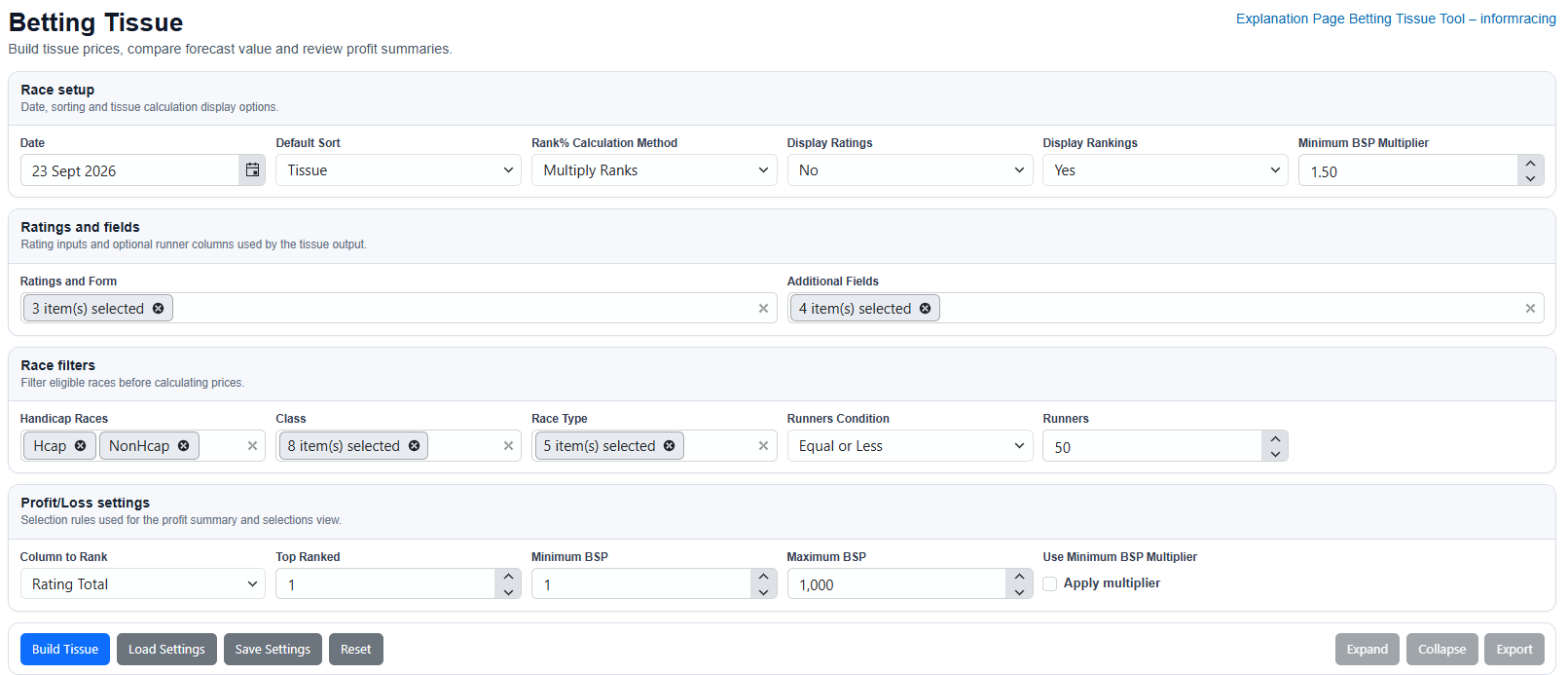
Rank% Calculation Method: This affects the Rank% shown on the output and therefore your tissue odds. There are four options here that calculate the Ratings and fields options that you select. Multiply the ranking positions when calculated or Add together the ranking positions. Or Multiply the ratings/numbers and Add together those rating/numbers.
Whichever you select, calculates a number for each horse. These are then totalled up and then each horses total is shown as a percentage of that total - this is the Rank%. If the total for the race happened to be 500 and horse A had a total of 210, then this horse would have a Rank% of 42, (as 210 is 42% of 500). This would then give that horse a tissue price of 2.38, (as 100%/42 = 2.38)
Example: If you select 3 ratings/fields - master rating, trainer form 14 days and course wins and a horse is ranked 3rd, 5th and 2nd across the runners in the race, then you can choose to multiply or add together 3, 5 and 2 to get either 30 or 10.
If the ratings/numbers for those fields are 84 (master rating), 6% (trainer form 14 days) and 2 (course wins), then by choosing to multply or add up these ratings/numbers you will get either 1008 or 92.
Hopefully you can see how using different options gives different sized totals and will therefor give different tissue odds. It is up to you which of the four options you select and it is best to play around with these until you feel you have found something that suits you.
Minimum Bsp Multiplier: Once you tissue has been calculated, you can increase (or decrease if laying), the tissue odds to build in some extra security. Default is set to 1.5, which multiplies your tissue odds by 1.5, so tissue odds of 3.31 will give a minimum bsp price of 4.96. You can then say that you are not going to back this horse unless the odds are 4.96 (or 4/1 as it is close to decimal odds 5.0).
So you build your tissue odds, then can add in an amount on top to ensure you are getting better value odds. Both the tissue odds and the Bsp multiplier odds are shown on the calculated cards so you can choose to use or ignore this.
Ratings and fields: This is where you select any or all of the form criteria that will be used to calculate your tissue odds.
Additional Fields: You can choose from a number of other form criteria to be shown on the calculated race cards, such as horse age, or jockey name for example. This can just give you some more info to use when selecting any bets.
Race filters: Select the race type, class and number of runners for just the races you want to have calculated.
Calculated race card - click the + to the left of a race to open it or you can select Expand (on previous image), to open all races.
Horse Rating: This is what is calculated by adding up the totals of your ratings/numbers. There are no options here, it always adds up the ratings/numbers to give you a Horse Rating.
Rank%, F/C Odds Decimal and Tissue: Rank% for each horse as explained previously, decimal forecast odds, so 9/1 will show as 10.0 etc. and Tissue which are your own calculated tissue prices. All races on the day are calculated in seconds, once you have chosen your settings and clicked Build Tissue.
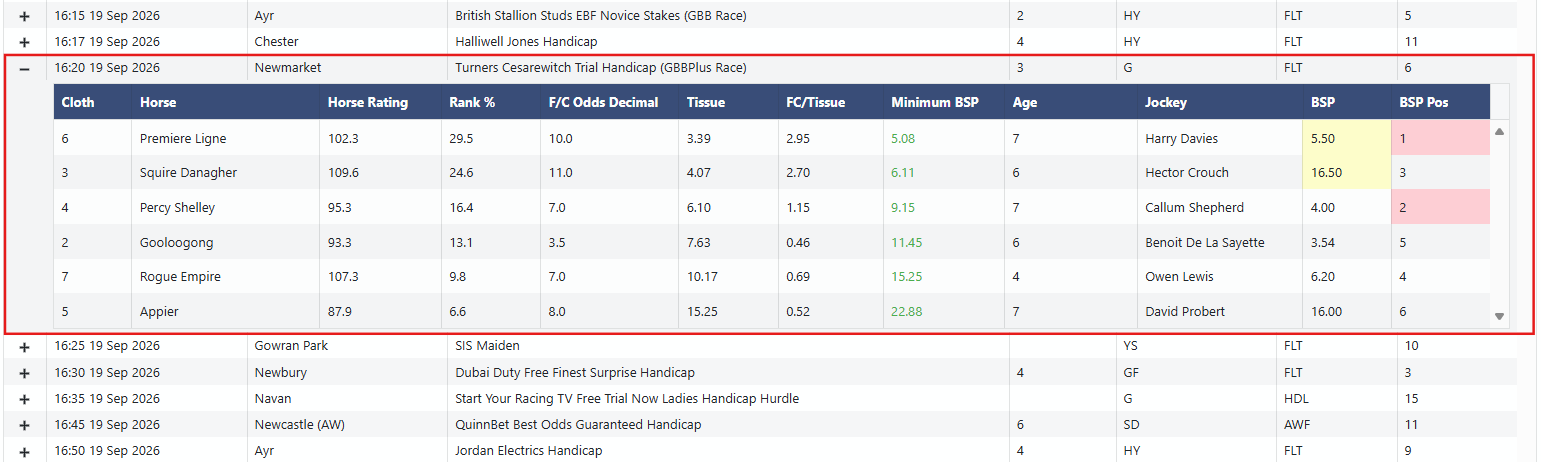
FC/Tissue: This divides the F/C Odds Decimal by your Tissue prices, so you can guage how much bigger or smaller your tissue odds are. I don't suggest blindly backing any horse that has bigger odds than your tissue odds, (this is generally what we call getting value by backing horses that your tissue odds suggest against the available price). If the forecast odds say the horse should be around 9/1 or 10.0, yet you have calculated it should be put in as the 3.39 favourite as in the example card below, then you could say you have found some value if you can get 9/1 about a horse you feel should be around the 9/4, 5/2 mark.
However, you want to try and stay within reason and also to have some confidence in the settings that you are using. Backing all 33/1 shots that you think should be Evens favourite, won't get you too far as 33/1 shots still only win about 2.4% of the time. Finding something around 8/1 that you think should be 4/1 second favourite is more reasonable and that would give a FC/Tissue figure of 1.8, so perhaps something over 1.3 and under 2.0 maybe a good place to start. Once you feel you have found the settings that are finding some good value bets, then you can make more bets at bigger odds.
You can also use the Betting Tissue Tool for Laying of course, just reverse the process and lay horses available at shorter odds than your tissue has claculated they should be.
Minimum BSP: This is your tissue odds multiplied by whatever you have selected in the settings, as explained above. So the defualt that is used above is 1.50 and the tissue odds for my favourite are 3.39, multiplied by 1.50 give 5.08, (just over 4/1). You can use this number to add some more security into each bet and use this as the minimum Bsp, or decimal odds, that you want for each horse before you place your bets.
Additional Fields (Age, Jockey, BSP and BSP Pos): As explained on the first image, these are what I have chosen to show as my additional fields. You can select from a number of form criteria, this can give you more information on the horse you want to back.
When looking back at past dates, you will want to use Bsp and Bsp Pos so you can see the odds and results.
BSP and BSP Pos coloured highlights: If a BSP is in yellow, this means that the BSP was bigger than your tissue price minimum bsp price, so you could say these would/could have been betting opportunities. BSP Pos shown in pink show the horses that won and placed in that race.
Profit and Loss Settings
You can use this when looking back at past results to see how your settings have fared.
Column to Rank: You can select which column you want to use for your results between Horse Rating Total or Tissue Odds
Top Ranked: If you want the top ranked only - so highest Horse Total or Tissue Favourite, select 1. For top two select 2 etc.
Minimum and Maximum BSP: Choose the odds range that you want all qualifiers to be between.
Use Minimum BSP Multiplier: If you tick this box, only qualifiers that had a BSP highlighted in yellow will be counted. Unticked it will show, in this example, all top two ranked runners from the Horse Total column, that had a BSP of between 3 and 17.
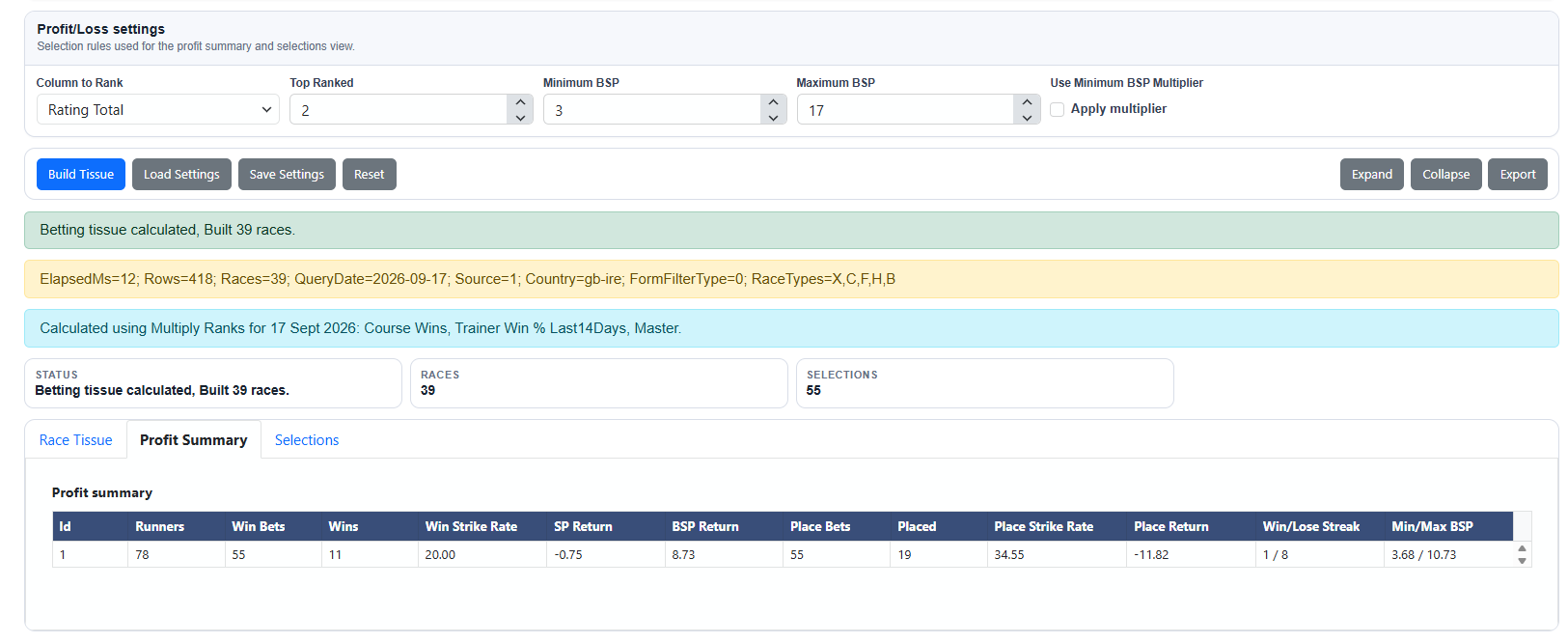
Profit Summary: Here you have the number of races, selected from the settings that you chose and the number of selections, from the Profit/Loss settings that you chose. Along with all of the results data for the 56 selections.
Selections: Click Selections to view all of the 56 bets.
Race Tissue: Click this again to return to the list of races for the date that you are looking at.